September 2, 2026
They were getting hundreds of comments a week and replying to about 40 of them. This case study covers what changed when Superpower stopped letting the rest go unanswered.
Apr 1, 2026
Want to export Instagram comments free with no limit? Here's what actually works in 2026, what hits Meta's API wall, and what brands do instead.

If you've searched for a way to export Instagram comments free with no limit, you've probably already hit the wall. You find a tool, it works for a few hundred comments, then it stops. Or it asks you to upgrade. Or it breaks because Meta changed something again.
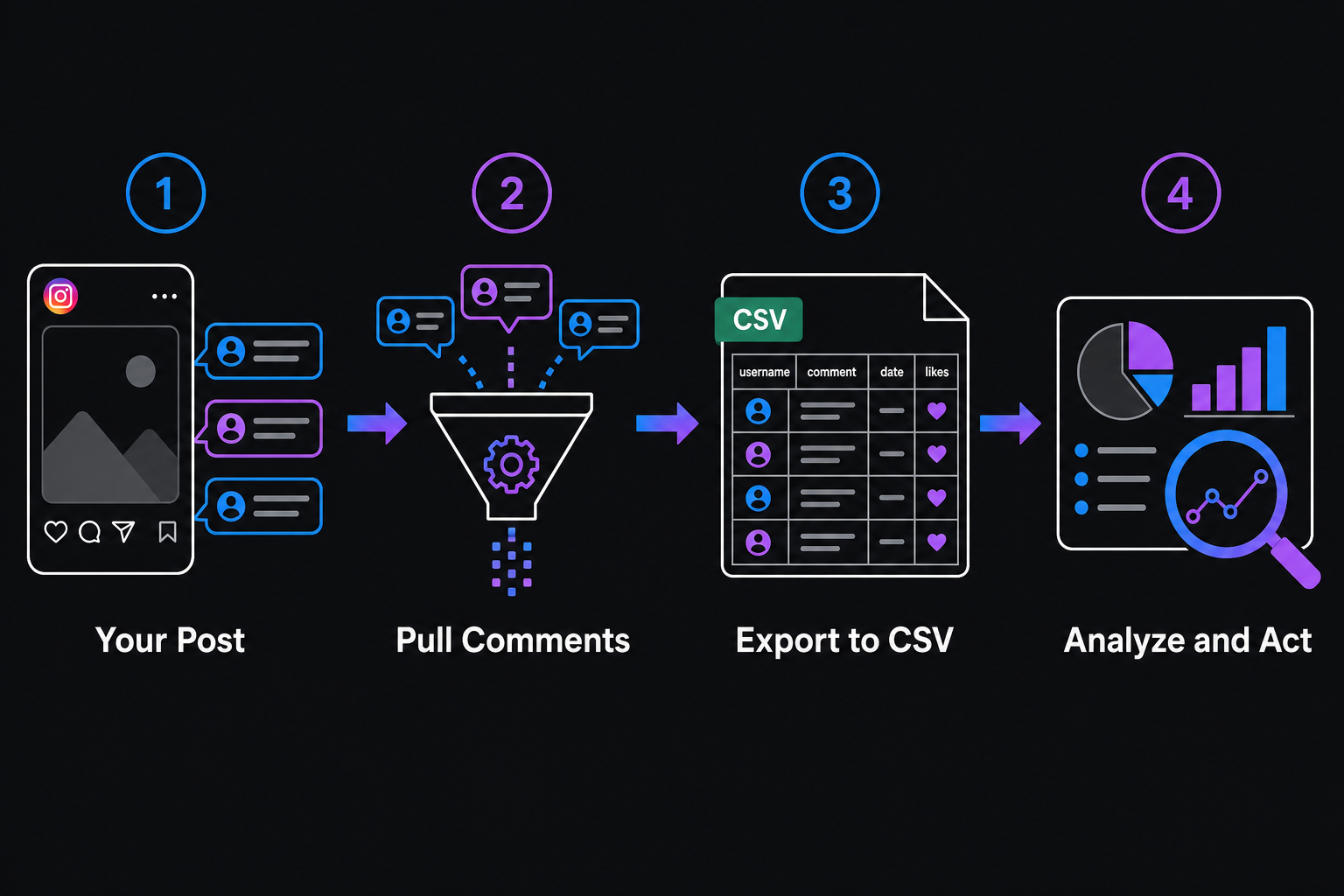
Usually it comes down to three things: analysis, reporting, or backup.
Analysis means pulling comment data to understand what customers are actually saying. What questions come up on every ad? What complaints keep appearing? What language are real buyers using that you should be using in your creative? Comments are some of the most useful customer feedback you have if you can get them out of Instagram and into a spreadsheet.
Reporting means showing a client or manager what the comment activity looked like across a campaign. Screenshots don't scale. A CSV does.
Backup means keeping a record before you delete or archive a post. Once it's gone, the comments go with it.
All three make sense. Meta just doesn't make it easy.
There are tools that genuinely work for small-scale exports. Here's what's actually available in 2026:
Phantombuster has an Instagram Comment Scraper that works on public posts. The free tier gives you a limited number of runs per month. For a brand with occasional export needs, it can be enough. It breaks when Instagram updates its page structure, which happens often.
Apify has Instagram scrapers that pull comments from public posts. The free tier is capped by compute units. For a few hundred comments across a handful of posts, it works. For an active ad account with thousands of comments across dozens of creatives, you'll burn through the free tier in a day or two.
Browser extensions built as Chrome comment exporters come and go. They tend to work until Instagram updates its frontend, then they stop working and aren't always maintained. Check the last update date before counting on one.
The pattern across all of them: every free tool has a ceiling. A comment count limit, a rate limit, a post count limit, or a reliability problem tied to platform changes. None of them are actually unlimited.
Meta has data export options, but they don't give you what you're looking for.
Through Meta Business Suite, you can export engagement metrics: total comments, reach, impressions. Aggregate numbers only. You cannot export individual comment text from Business Suite in any usable format.
Through the Meta Graph API, a developer can pull comment data programmatically. That requires app setup, Meta's app review process for certain permissions, and even then you're subject to rate limits on how many comments you can pull per hour. It works, but it's not a quick free solution for a non-technical team.
Meta tightened API access significantly after Cambridge Analytica, and those restrictions are still in place. Any tool claiming truly unlimited free access to Instagram comments via the official API is either misleading you or scraping in a way that could get your account flagged.
For a brand posting a few times a week with modest engagement, free tools might genuinely be enough. For a Shopify brand running five active ad sets with hundreds of comments coming in daily, the free tier of anything runs out fast.
But the bigger issue isn't the comment count limit. It's the timing problem.
Exporting comments after the fact tells you what happened. It doesn't help you while an ad is live. A negative comment sitting under your best creative for six hours before you export and notice it has already done its damage. People scrolled past it. Your conversion rate may have dipped before anyone looked. Whether Meta's algorithm weighs comment quality in ad delivery is debated, but most media buyers who've run tests believe it does.
Export tools are built for analysis, not for catching problems while they're happening. That's a real gap if you're spending real money on ads.
Some brands that run a lot of ads have moved away from export-and-review as a primary workflow and toward managing comments as they come in. Not because export is useless, but because it's too slow for day-to-day ad management.
The practical version of that looks like:
Export still makes sense for specific use cases: quarterly voice-of-customer reviews, creative briefs, client reporting. For those, a paid plan on Phantombuster or Apify is usually worth it once you've outgrown the free tier.
But if you're running Facebook or Instagram ads and find yourself piecing together exports just to keep up with what's happening in your comment sections, that's a sign the workflow has gotten too manual. Superpower is one option worth looking at if you're at that point.

Explore expert tips, industry trends, and actionable strategies to help you grow, and succeed. Stay informed with our latest updates.

September 2, 2026
They were getting hundreds of comments a week and replying to about 40 of them. This case study covers what changed when Superpower stopped letting the rest go unanswered.
.jpg)
August 5, 2026
Respondology starts at $30-40k/year. Here's how it compares to Superpower for brands that want the same managed comment moderation without the enterprise overhead.

Block toxic comments automatically, respond at scale, and keep your brand safe in real time.