September 2, 2026
They were getting hundreds of comments a week and replying to about 40 of them. This case study covers what changed when Superpower stopped letting the rest go unanswered.
May 26, 2026
8 min read
Your team can't delete comments fast enough. This guide covers how to delete Instagram comments at scale, when deletion is the right move, and what high-volume brands do instead of manual moderation.

You know how to delete a single Instagram comment. Tap, hold, delete. That's not why you're here.
You're here because you're running paid ads, your comment sections are filling up faster than your team can scroll, and you need a system that doesn't involve checking your phone every 20 minutes. This guide covers how to delete Instagram comments at scale, when deletion is actually the right move, and what modern brands do instead of playing whack-a-mole.
If you're spending $5k+ per month on Meta ads, you're generating hundreds (sometimes thousands) of comments daily. Some are genuine questions. Some are purchase intent signals. And some are spam, competitor mentions, or the kind of negativity that tanks your ad performance.
Manually deleting comments doesn't scale. You miss the 2am troll comments that sit there for 8 hours. You accidentally delete actual customer questions while speed-scrolling. And you're burning hours that should go toward strategy, creative, or literally anything else.
The real question isn't how to delete Instagram comments. It's how to build a comment moderation workflow that handles volume without breaking your team.
Meta Business Suite is the first stop for most brands. It consolidates your Facebook and Instagram comments into a single inbox, which is already better than checking two apps separately.
Here's how to use it for comment management:
The bulk actions are limited. You can select multiple conversations in the inbox view, but true bulk deletion of comments across posts isn't native. Meta Business Suite works for brands with manageable volume. Once you're past 100 comments per day, you'll feel the friction.
*What it does well:*
*Where it falls short:*
Instagram itself offers some comment management features that many brands underuse. These won't help you delete faster, but they'll reduce what hits your feed in the first place.
*Turn on Hidden Words (Settings > Privacy > Hidden Words):*
*Enable Manual Comment Filtering:*
*Limit Who Can Comment:*
These native controls are preventive, not reactive. They work best as a first layer of defense while you handle the comments that slip through.
When Meta Business Suite can't keep up, most brands turn to third-party tools. These generally fall into two categories:
Rule-based tools let you set triggers: if a comment contains X word, delete it. Simple, fast, but dumb. They'll catch "cheap" when someone asks about pricing, and miss creative spellings of actually problematic words.
AI-powered tools read intent, not just keywords. A comment saying "this is scammy" gets flagged differently than "is this a scam? I want to buy but I'm nervous." One is an attack. The other is a purchase intent signal hiding behind cautious language.
For brands running serious ad spend, AI moderation pays for itself. The alternative is hiring someone to monitor comments 12 hours a day, or missing the negative comment that sits on your best-performing ad and tanks its relevance score.
Superpower falls into the AI category. It reads context, handles multi-turn DM conversations, and integrates with Shopify so comment replies can actually reference order status and product info. Full disclosure: that's us. But we built it because the rule-based tools weren't cutting it for the brands we worked with.
Not every negative comment deserves deletion. In fact, aggressive deletion can backfire. Here's the decision framework:
*Delete when:*
*Hide when:*
*Leave when:*
The worst look for a brand is a comment section that's obviously curated. A few critical comments with thoughtful responses builds more trust than a wall of unbroken praise.
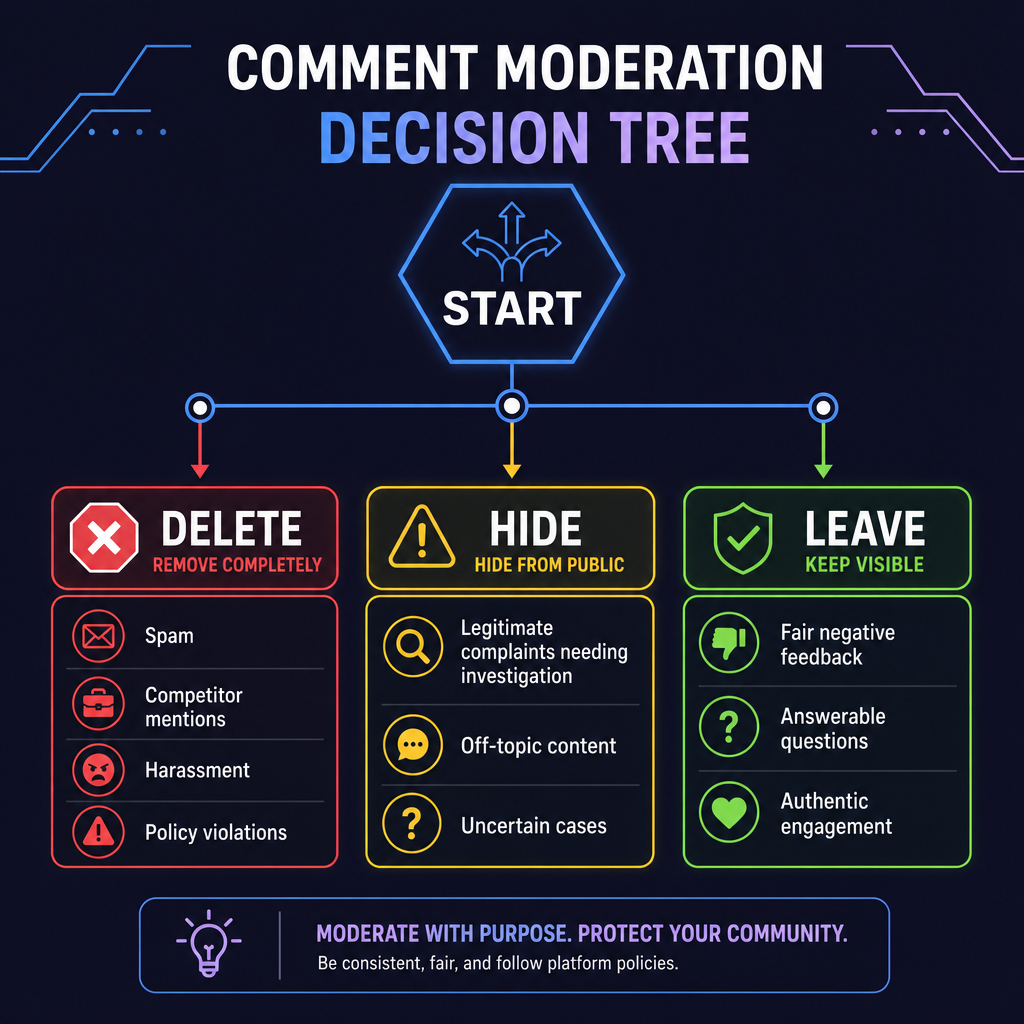
If you're running conversion campaigns at scale, your comment strategy directly impacts performance. Here's what matters:
Response time affects ad delivery. Instagram's algorithm notices when comments pile up without engagement. A post with 200 comments and zero replies signals "this brand ignores customers," which influences relevance scoring.
Negative comments hurt your cost per result. One visible "this brand is a scam" comment sitting on your highest-spend ad does real damage. Not theoretical damage. Go check your CPMs on ads with negative comment threads versus clean ones.
Hidden comments still exist. Hiding a comment removes it from public view but keeps it accessible to you. This is useful for comments you're not sure about. Deleted comments are gone forever.
Bulk actions are time-boxed. If you're doing weekly bulk moderation instead of daily or real-time, you're leaving problematic comments visible during your highest-traffic hours.
The shift most scaling brands make: from manual moderation to automated triage. AI catches the obvious spam and flags the gray area. A human reviews the flagged items. Nothing sits on your ads without review for more than a few hours.
Here's a practical workflow for brands processing 100+ comments daily:
*Layer 1: Prevention*
*Layer 2: Automated Triage*
*Layer 3: Human Review*
*Layer 4: Analytics*
This isn't overkill. It's what healthy ad accounts look like at scale.
If you're just getting started with Meta Business Suite for comment management, this tutorial covers the inbox section and how to navigate comments, messages, and notifications in one place:
Here's the mindset shift that separates overwhelmed social teams from ones running smoothly:
Stop thinking about comment moderation as "deleting bad stuff." Start thinking about it as "protecting your ad performance and surfacing customer signals."
A good moderation system isn't just a spam filter. It's a way to:
When brands ask us why they should automate comment moderation, the answer isn't "so you can delete faster." It's "so you can stop losing money to unmanaged comment sections."
If you're still manually moderating Instagram comments:
For brands spending $5k+ on ads with active comment sections, Superpower handles comment moderation and DM automation with AI that actually understands what people mean, not just what they say. We're Shopify-native, sync with Klaviyo, and most brands set up in under 10 minutes.
Looking for how to delete individual comments on your personal account? Check out our guide to deleting comments on Instagram for step-by-step instructions.

Explore expert tips, industry trends, and actionable strategies to help you grow, and succeed. Stay informed with our latest updates.

September 2, 2026
They were getting hundreds of comments a week and replying to about 40 of them. This case study covers what changed when Superpower stopped letting the rest go unanswered.
.jpg)
August 5, 2026
Respondology starts at $30-40k/year. Here's how it compares to Superpower for brands that want the same managed comment moderation without the enterprise overhead.

Block toxic comments automatically, respond at scale, and keep your brand safe in real time.